
Product Screenshots
Scrubbing Lists with Call List Scrubber

 © 2010, Tarver Program Consultants, Inc.






















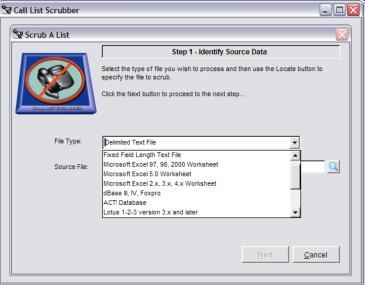 STEP 1:
The process of scrubbing a list starts by Identifying your Source Data.
STEP 1:
The process of scrubbing a list starts by Identifying your Source Data. Click the drop down box to select the file type and then click the
magnifying glass to browse and find the file you wish to scrub.
Click the drop down box to select the file type and then click the
magnifying glass to browse and find the file you wish to scrub.
 STEP 1a:
Whenever Call List Scrubber needs additional information to complete the
import process, you will be presented with easy to understand screens
and prompts. Click here to see how this same screen looks when
importing a fixed field length file. Click ‘Next’ to continue.
STEP 1a:
Whenever Call List Scrubber needs additional information to complete the
import process, you will be presented with easy to understand screens
and prompts. Click here to see how this same screen looks when
importing a fixed field length file. Click ‘Next’ to continue.
 STEP 2:
After identifying all of the data contained in your import file, Call List
Scrubber then asks you to select exactly what data you want to include in
the output file. Click on a field and you can view samples of the data
contained in that field. You can either select export fields one by one or
click the “Select All” button to include all fields in the final output. Click
‘Next’ to continue.
STEP 2:
After identifying all of the data contained in your import file, Call List
Scrubber then asks you to select exactly what data you want to include in
the output file. Click on a field and you can view samples of the data
contained in that field. You can either select export fields one by one or
click the “Select All” button to include all fields in the final output. Click
‘Next’ to continue.
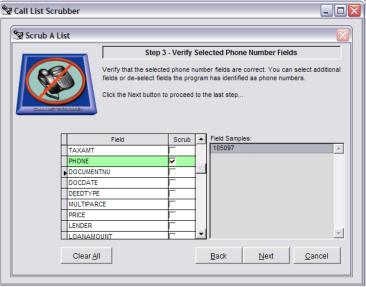 STEP 3:
As you move from Step 2 to Step 3, Call List Scrubber attempts to identify
which export fields you have select that contain phone numbers. You can
override the automatic selections and manually choose the fields
containing telephone numbers by clicking and placing a checkbar in the
Scrub column. Once all the telephone numbers have been identified, click
‘Next’ to continue.
STEP 3:
As you move from Step 2 to Step 3, Call List Scrubber attempts to identify
which export fields you have select that contain phone numbers. You can
override the automatic selections and manually choose the fields
containing telephone numbers by clicking and placing a checkbar in the
Scrub column. Once all the telephone numbers have been identified, click
‘Next’ to continue.
 STEP 4:
The last step is to tell the Call List Scrubber exactly where you want to
save the output file and what type format you want the output to be. Click
‘Finish” and the program will scrub the list and present you with a report of
the numbers scrubbed from the original import file.
STEP 4:
The last step is to tell the Call List Scrubber exactly where you want to
save the output file and what type format you want the output to be. Click
‘Finish” and the program will scrub the list and present you with a report of
the numbers scrubbed from the original import file.
















© 2010, Tarver Program Consultants, Inc.
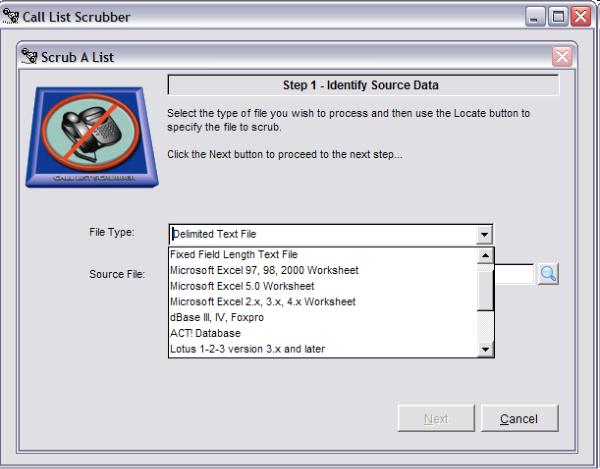 STEP 1:
The process of scrubbing a list starts by Identifying your Source Data.
Click the drop down box to select the file type and then click the
magnifying glass to browse and find the file you wish to scrub.
STEP 1:
The process of scrubbing a list starts by Identifying your Source Data.
Click the drop down box to select the file type and then click the
magnifying glass to browse and find the file you wish to scrub.
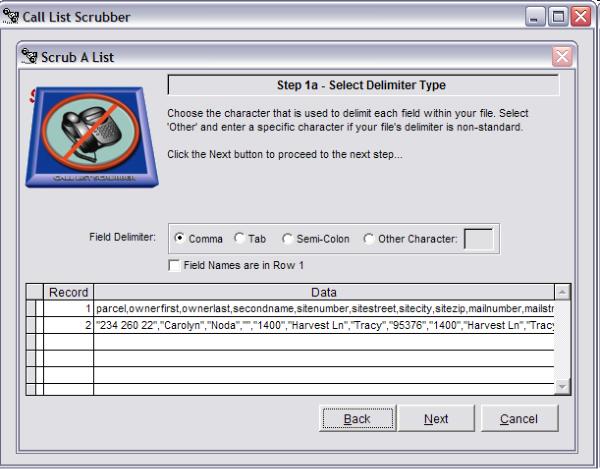 STEP 1a:
Whenever Call List Scrubber needs additional information to complete the
import process, you will be presented with easy to understand screens
and prompts. Click here to see how this same screen looks when
importing a fixed field length file. Click ‘Next’ to continue.
STEP 1a:
Whenever Call List Scrubber needs additional information to complete the
import process, you will be presented with easy to understand screens
and prompts. Click here to see how this same screen looks when
importing a fixed field length file. Click ‘Next’ to continue.
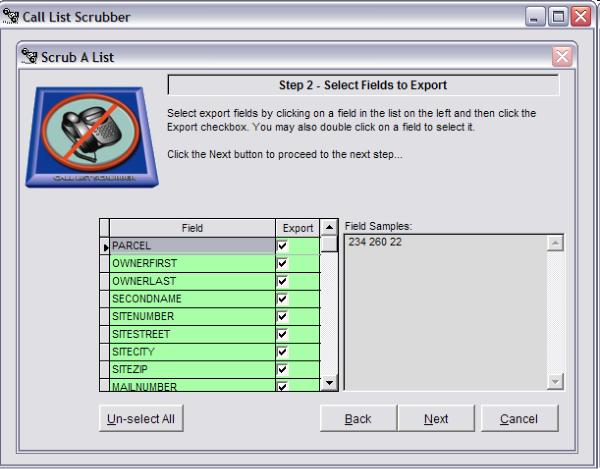 STEP 2:
After identifying all of the data contained in your import file, Call List
Scrubber then asks you to select exactly what data you want to include in
the output file. Click on a field and you can view samples of the data
contained in that field. You can either select export fields one by one or
click the “Select All” button to include all fields in the final output. Click
‘Next’ to continue.
STEP 2:
After identifying all of the data contained in your import file, Call List
Scrubber then asks you to select exactly what data you want to include in
the output file. Click on a field and you can view samples of the data
contained in that field. You can either select export fields one by one or
click the “Select All” button to include all fields in the final output. Click
‘Next’ to continue.
 STEP 3:
As you move from Step 2 to Step 3, Call List Scrubber attempts to identify
which export fields you have select that contain phone numbers. You can
override the automatic selections and manually choose the fields
containing telephone numbers by clicking and placing a checkbar in the
Scrub column. Once all the telephone numbers have been identified, click
‘Next’ to continue.
STEP 3:
As you move from Step 2 to Step 3, Call List Scrubber attempts to identify
which export fields you have select that contain phone numbers. You can
override the automatic selections and manually choose the fields
containing telephone numbers by clicking and placing a checkbar in the
Scrub column. Once all the telephone numbers have been identified, click
‘Next’ to continue.
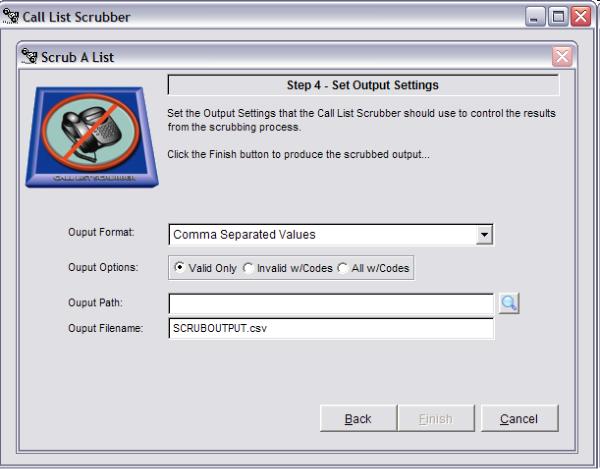 STEP 4:
The last step is to tell the Call List Scrubber exactly where you want to
save the output file and what type format you want the output to be. Click
‘Finish” and the program will scrub the list and present you with a report of
the numbers scrubbed from the original import file.
STEP 4:
The last step is to tell the Call List Scrubber exactly where you want to
save the output file and what type format you want the output to be. Click
‘Finish” and the program will scrub the list and present you with a report of
the numbers scrubbed from the original import file.